Donations Security
-
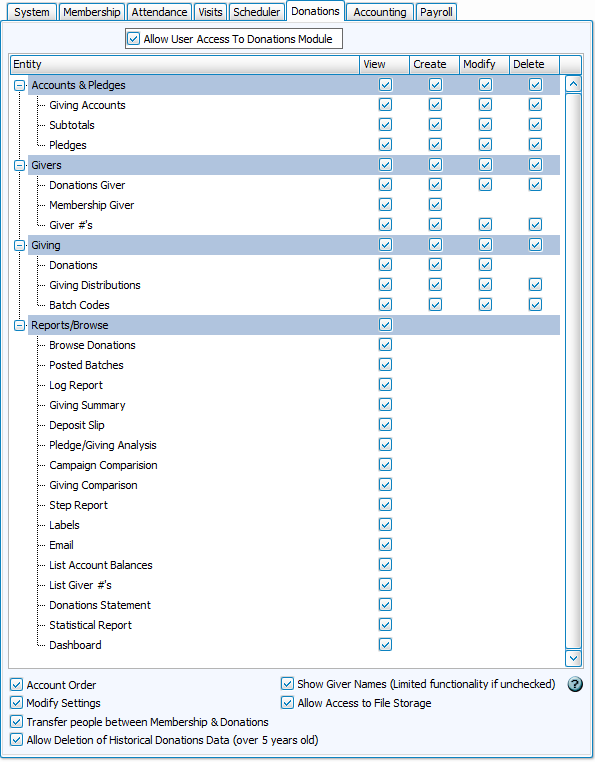
The Donations module allows for recording of income that has been contributed by your members. Along with donations, this module also keeps track of pledges and pledge campaigns, giving accounts, and envelope numbers. Reports in Donations analyze contributions, compare accounts and time periods, and summarize donations.
Module-Specific Security Settings
With the user selected on the left, you can make module specific settings through the tabs on the right. Overall access to opening the module can be toggled with a check box at the top of the screen. Areas of the module are divided into groups of features. These areas are highlighted in blue and can be expanded for more detail by clicking the  and collapsed with
  . Access to some features may depend on access to others (for example, to edit list field codes, a user would need access to People).
View
Allows User to open and view the screen and information
Create
Allows User to make additions and enter new information
Modify
Allows User to make changes and edits to existing information
Delete
Allows User to remove information
Recommended Competencies
-
Accounts can be linked to the Accounting module from either side, but it's helpful to understand how the modules communicate.
-
Givers can have their names hidden which makes donations information anonymous. Users can enter donations by Giver # and produce Donation Reports without giver names, but functionality outside of these tasks is limited. There is no access to Browse Donations, Posted Batches, Givers and most reports, including statements.
-
Donations Settings include user-specific and module-wide settings.
-
File storage can contain any kind of upload, and thus may contain confidential information.
-
Transfer Donations Records to Membership and Transfer Membership Records to Donations are procedures to move records between Membership and Donations. The differences between these are outlined in People Records. Both kinds of records can have donations assigned to them, but they store different kinds of information and are edited in their respective modules. Staff that are managing and categorizing records, may require access to both People and Givers to be independently effective.
-
Giving permission to Delete Historical Donations Data allows the User to permanently delete all Donations history older than 5 years, and should be reserved for people with high authority.